What data do we need from you for offline creation of a Mitutoyo measurement program?
To create a measurement program for your Mitutoyo coordinate measuring machine with MCOSMOS offline, we need the complete configuration of your machine in addition to the part data. How offline creation works at CSL is described on the CMM programming for Mitutoyo MCOSMOS page. This guide covers the data you provide for it.
1. The complete folder of your active CMM configuration
In the PartManager, bottom right, click the active machine. Then select "Open CMM configuration directory" (in the German interface: «KMG-Konfigurationsverzeichnis öffnen»).
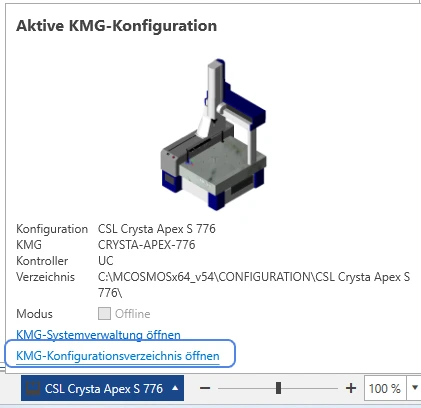
MCOSMOS opens the folder of the machine configuration currently in use. A typical path looks like this:
C:\MCOSMOSx64_v54\CONFIGURATION\Your machine configuration\
How to proceed
With this folder we transfer your machine configuration to our system and create the measurement program offline, matched to your machine, your probe system and your settings.
2. A sample program from your machine
If possible, also send us an MCOSMOS measurement program already used on your machine. It does not have to belong to the part we are writing the new program for.
A sample program helps us follow your existing programming standard:
- naming conventions
- designations of programs and features
- storage and directory paths
- program structures in use
- customer-specific settings and procedures
This way the new measurement program also matches your existing MCOSMOS programs. What a program costs and how it is quoted is described on the CMM programming page.